 Windows Products


 Mac Products
 One management tool for all smartphones to transfer files between PC & iOS/Android devices.

Syncios iOS & Android Manager supports managing data on and off your iPad, iPhone, iPod, Android phone, allowing you easily transfer data including music, video, photo, apps, contacts and more between iPod/iPhone/iPad/Android phone and PC. This iOS & Android Manager also features more functions to better manage your iDevices & Android phone, such as Ringtone Maker, handy Audio & Video converter, etc.
You can keep and use the free version or simply upgrade to Ultimate version with Syncios registration name and code. What's the difference between Syncios Free and Ultimate Version?
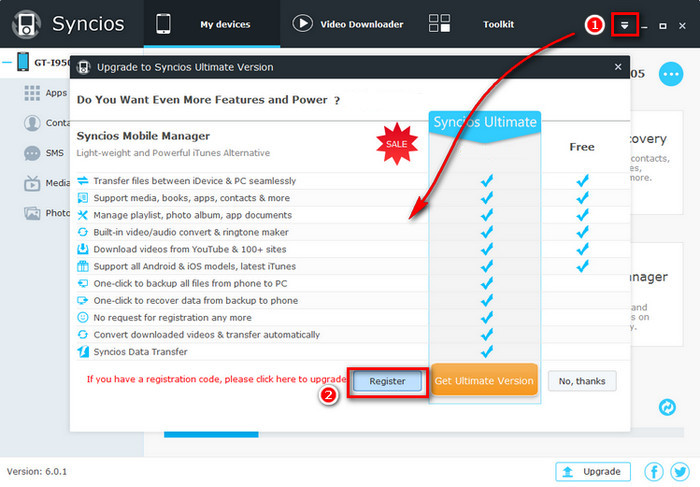
Step 1: Click  button on the upper right corner, and click Register to get Syncios Ultimate version.
Step 2: You will see the promotion prompt. This page shows differences between Pro and Free version. If you have already purchased, please click Register.
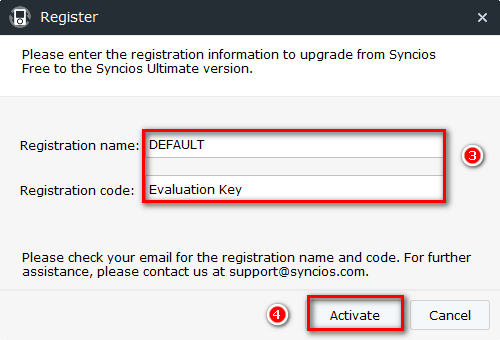
Step 3: Copy and paste your Registration name and Registration code.
Step 4: Click Activate button to finish registration.
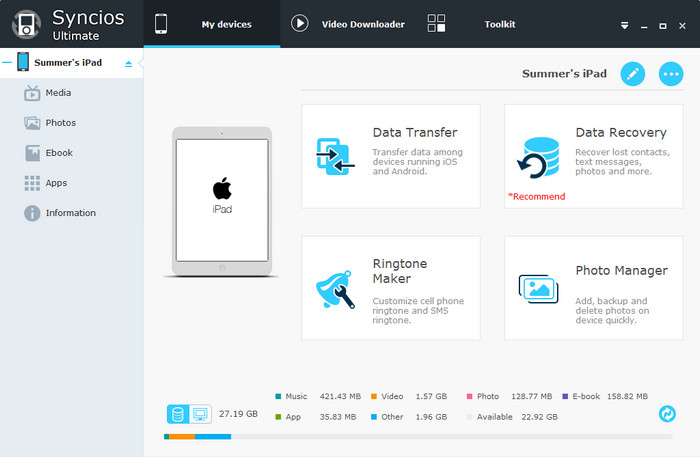
1. Under My Device tab, choose items to manage from the left panel: Media, Photos, Apps and Information.
2. Choose the operation to backup data from iPhone, iPad, iPod or Android phone to PC or copy from PC to Android or iOS devices.
After your device connected, it will be recognized and displayed in the primary window.
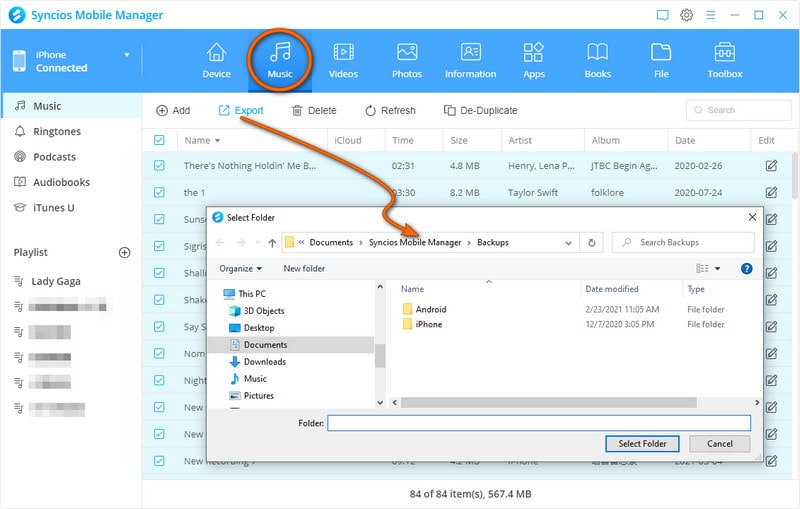
To transfer Android/iOS music to Windows PC, click Media tab on the left panel of Syncios and then choose the audio type from right panel, including Music, Ringtones, Podcasts, Audiobooks and Voice Memos. Just hightligt Music, all music on your iPhone/iPad/iPod/Android phone wil be displayed on the main window. Simply select the songs you want to transfer and click Export option.
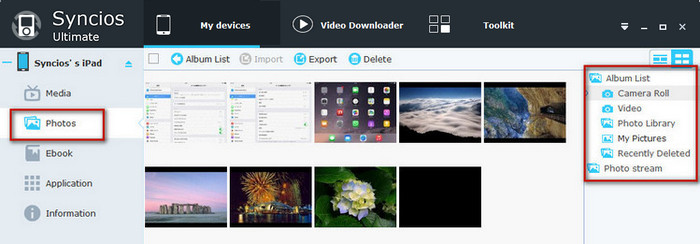
To transfer Android/iOS photos to Windows PC, click Photos tab on the left panel of Syncios, all the albums will be displayed in the main window. Manage the whole album by choosing operation from Import, Export, Delete. Select the album or photos in your device, and then click Export button to transfer photos from Android or iOS to PC.
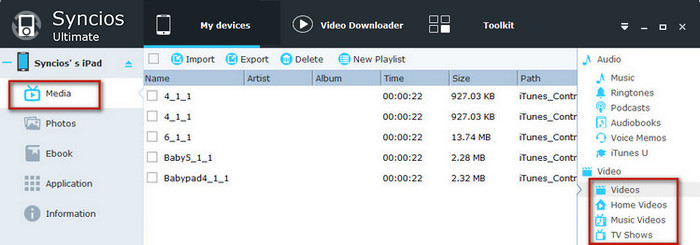
To transfer Android/iOS videos to Windows PC, click Media tab on the left panel and choose the video type from right panel, including Videos, TV Shows, Music Videos, iTunes U. Choose video files in your device, and then press Export button to transfer videos from Android or iOS to PC.
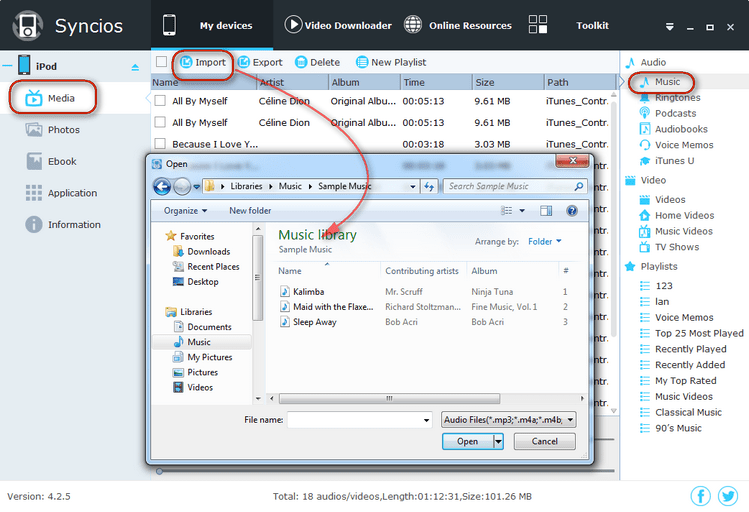
It's not a hard job to transfer music/videos/photos from Windows PC to your Android/iOS phone. Simply press Media, Photos tab on the left panel of Syncios. Then click Import to browse your PC for the video, audio, or photo files you want to import to your Android or iOS device. After finding them, click Open to transfer music, videos, photos to your Android phone or iOS devices.
1. Click Online Videos tab, click Add URL(s) button and paste online video URL to the pop-out box. Use Enter key to put each URL on a new line.
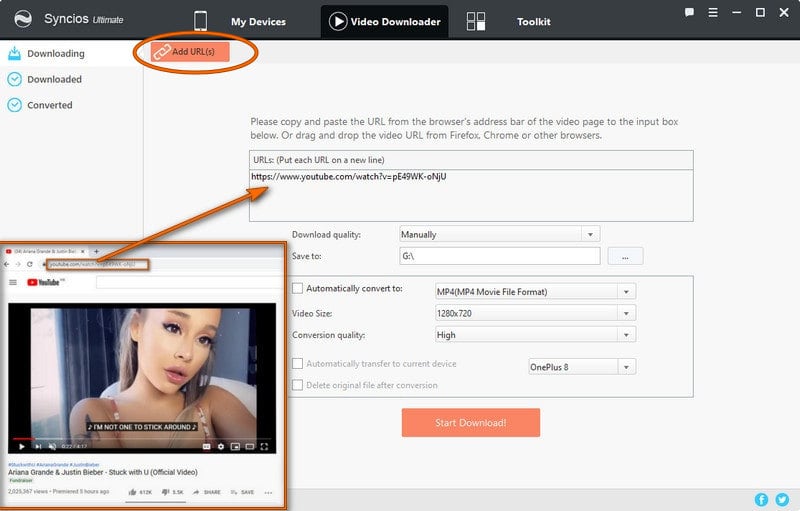
Note: Pro version supports automatically converting and importing downloaded videos to your iOS devices, just tick "Automatically transfer to current device." before downloading, it also allows you to select the download quality, output video format, video size, conversion quality.
Download quality: Manually, Best Quality, Smallest File.
Output Video Format: just tick the checkbox of "Automatically convert to" and then choose the video format you need.
Video Size: all kinds of size for your choice.
Conversion quality: Low, Normal, High.
Also, you can choose to delete the original file after conversion.
2. Click Start Download! button, choose video download format and start downloading.
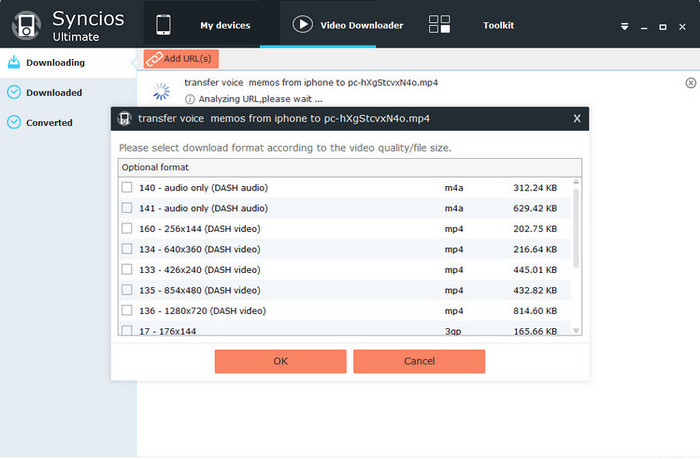
3. Wait until the video downloading finished and it would display under the Downloaded list.
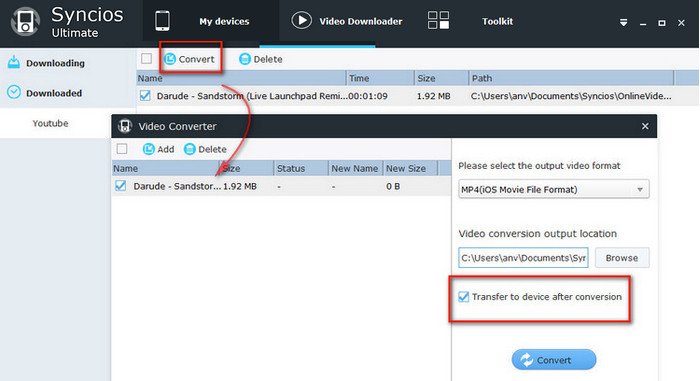
4. Check downloaded online videos you would like to convert and transfer to your device. Hold down the Ctrl/Shift key to select multiple video files.
5. Click Convert button. Choose output video format and video conversion output location. If you would like to transfer video to connected device automatically, simply check the option: Transfer to device after conversion.
6. Click Convert button to start the video conversion process.
Syncios not only gives you better experience to manage your iPhone, iPad, iPod, Android, but also offers more amazing functions such as built-in video converter, audio converter, and ringtone maker. How to convert video for Android phone or iPhone/iPad/iPod?
1. Under Toolkit, go to Common Functions and click the Video Converter icon.
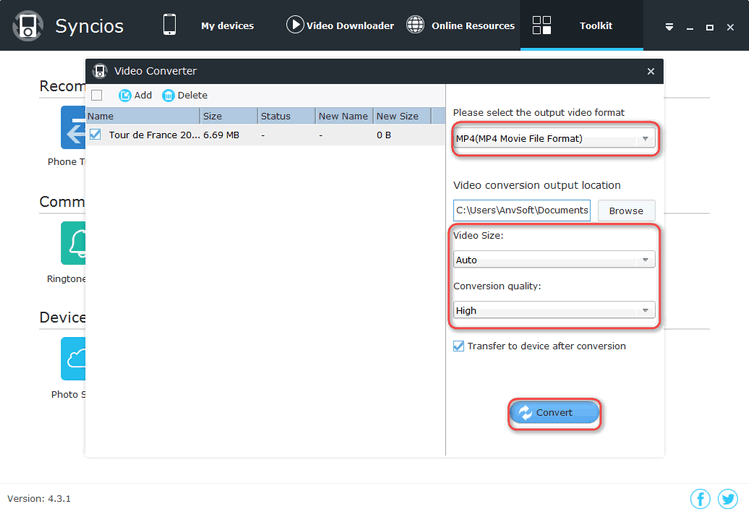
2. Choose output video format supported by Android device or iPhone, iPad, iPod, including MP4, M4V and MOV, and then click Browse to select an output folder for the converted video file. Now, press Convert button to start the video conversion process.
Tips: If you would like to transfer output video file to current device automatically, please simply check Transfer to device after conversion option.You can also choose the Video Size and Conversion Quality.
Syncios not only features as great iOS & Android Manager, but also easy-to-use Audio/Video Converter and iPhone Ringtone Maker. How to make iPhone ringtone?
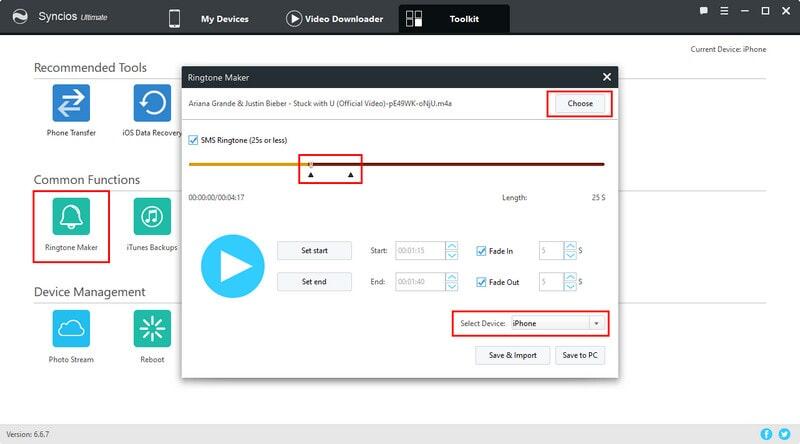
1. Click Toolkit > Ringtone Maker to start the ringtone maker tool.
2. Choose a music file on your PC or drag and drop file to Syncios directly.
3. Set start and Set end to the ringtone and choose effect from Fade In and Fade Out. If you would like to make SMS tone, just simply check the SMS Ringtone option.
4. Choose Save & Import button Syncios would convert your ringtone and then import to current device shown on the upper right corner automatically. Choose Save to PC button you can simply save the output ringtone to local PC.
5. Go to your iOS device, click Settings > Sounds > Ringtone, where you would find the ringtone.
More toolkits? Click here.
Roger Morgan
"I find your programs is BEST i love it!! That easy job and transter PC to Ipad and Ipad to PC and easy everything i test evertthing. Thank you muchh FREE APPS and unlimited i love much this!!!"
